Introduction
With rising awareness around data privacy and identity theft, protecting personal information has become essential. Aadhaar is widely used for verification across services, but sharing the full Aadhaar number everywhere can increase the risk of misuse. This is where a masked Aadhaar download becomes useful, allowing you to verify identity while keeping sensitive details secure.
For those needing quick financial access while keeping documents safe, you can also get instant personal loan using masked Aadhaar as part of your secure verification.
What Is a Masked Aadhaar Card?
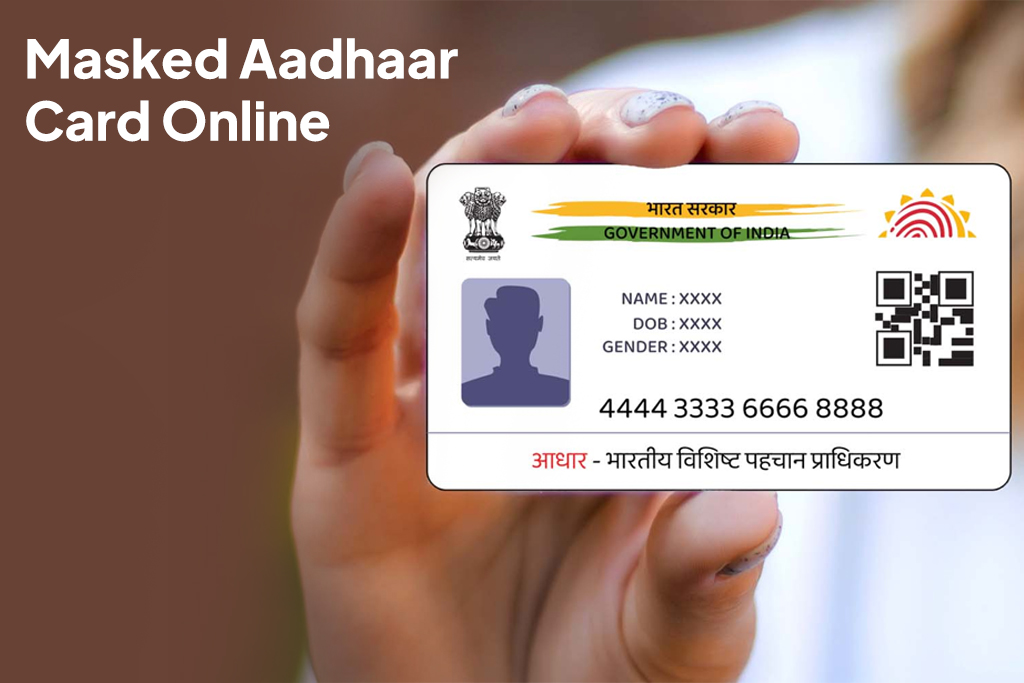
A masked Aadhaar card is a digitally generated version of your Aadhaar where only the last four digits of the Aadhaar number are visible. The remaining digits are hidden with “XXXX”, ensuring privacy while retaining the document’s validity.
It contains:
- Name
- Photograph
- QR code
- Last four digits of Aadhaar
This answers the common question: what is a masked Aadhaar card?. It’s a safer alternative to the regular Aadhaar.
Why Should You Use a Masked Aadhaar Card?
Using a masked Aadhaar card online helps:
- Protect your Aadhaar number from misuse
- Reduce identity theft risks
- Share identity details safely with third parties
- Comply with data privacy best practices
It is especially useful when uploading documents online or sharing ID with private entities.
Is Masked Aadhaar Valid Everywhere?
Yes, masked Aadhaar is a valid identity document for most verification purposes. Government bodies, banks, telecom providers, and many private institutions accept it. However, in rare cases where full Aadhaar details are legally required, the regular Aadhaar may be requested.
For everyday verification, masked Aadhaar is widely accepted and recommended.
How to Download Masked Aadhaar Card Online via UIDAI Website
You can easily complete a masked Aadhaar download online through the official website of UIDAI.
Steps:
- Visit the official UIDAI website
- Select “Download Aadhaar”
- Enter your Aadhaar number, enrolment ID, or VID
- Choose the option to download masked Aadhaar
- Verify using OTP sent to your registered mobile number
- Download the PDF file
The downloaded file is password-protected for security.
How to Download Masked Aadhaar Using mAadhaar App
The mAadhaar app offers a mobile-friendly way to access your Aadhaar.
Steps:
- Download and open the mAadhaar app
- Register using your Aadhaar-linked mobile number
- Log in and select your Aadhaar profile
- Choose the option to view or download masked Aadhaar
- Save or share securely
This method is convenient for quick access on the go.
How to Download Masked Aadhaar from DigiLocker
You can also download masked Aadhaar through DigiLocker.
Steps:
- Log in to your DigiLocker account
- Go to “Issued Documents”
- Select Aadhaar issued by UIDAI
- Choose the masked Aadhaar option
- Download or share the document digitally
This is useful when you already use DigiLocker for document storage.
Difference Between Masked Aadhaar and Regular Aadhaar
| Feature | Masked Aadhaar | Regular Aadhaar |
| Aadhaar Number | Only last 4 digits visible | Full 12-digit number |
| Privacy Level | High | Moderate |
| Validity | Valid for most uses | Valid everywhere |
| Risk of Misuse | Low | Higher if shared openly |
This comparison highlights why many users prefer masked Aadhaar.
When Should You Use a Masked Aadhaar Card?
You should use a masked Aadhaar when:
- Submitting ID online
- Sharing documents with private platforms
- Uploading KYC details digitally
- Providing identity proof where full Aadhaar is not mandatory
It balances identity verification with privacy protection.
Common Issues While Downloading Masked Aadhaar
Some common challenges include:
- Mobile number not linked to Aadhaar
- OTP not received due to network issues
- Incorrect details entered during verification
- Temporary website downtime
Ensuring your mobile number is updated with Aadhaar usually resolves most issues.
Conclusion
In today’s digital-first world, protecting personal data is just as important as accessing services quickly. A masked Aadhaar download offers a simple, secure way to share your identity without exposing sensitive information. Whether through the UIDAI website, mAadhaar app, or DigiLocker, downloading a masked Aadhaar card online is easy and highly recommended.
Additionally, if you’re applying for financial services, always apply for loan with secure documents to ensure both convenience and privacy.
FAQs
1. Is masked Aadhaar legally valid?
Yes, it is valid for most verification purposes.
2. Can I use masked Aadhaar for KYC?
Yes, many organisations accept masked Aadhaar for KYC.
3. Is masked Aadhaar safer than regular Aadhaar?
Yes, because it hides most of the Aadhaar number.
4. Do I need a registered mobile number to download masked Aadhaar?
Yes, OTP verification is required.
5. Can I convert my regular Aadhaar into masked Aadhaar?
Yes, you can choose the masked option during download.
| Personal Loans by City | ||||
|---|---|---|---|---|
| Personal Loan Bengaluru | Personal Loan Thane | Personal Loan Mumbai | Personal Loan Hyderabad | |
| Personal Loan Pune | Personal Loan Surat | Personal Loan Coimbatore | Personal Loan Delhi | |
| Personal Loans by Amount | ₹60,000 Personal Loan | ₹3 Lakh Personal Loan | ₹5 Lakh Personal Loan |
|---|